
iPhone · iPad · Android · Mac
Fill and sign any PDF form, one question at a time.
Open or scan a form, answer simple questions, sign with your finger and share the finished PDF. No account needed, and your documents stay on your device.
Fillstep isn't on the stores yet. It's coming to the App Store, the Mac App Store and Google Play. Email me when it's out
- Works offline
- No account needed
- Nothing is uploaded
Rental application
Maple Grove Property Management
1. Applicant
2. Current address
3. Agreement
I confirm the information above is true.
Question 1 of 3
Full name
Where is this?
NextQuestion 2 of 3
Date of birth
Where is this?
NextQuestion 3 of 3
Signature
NextReady to share
Rental application.pdf
ShareHow it works
From blank form to signed PDF in three steps
- 01
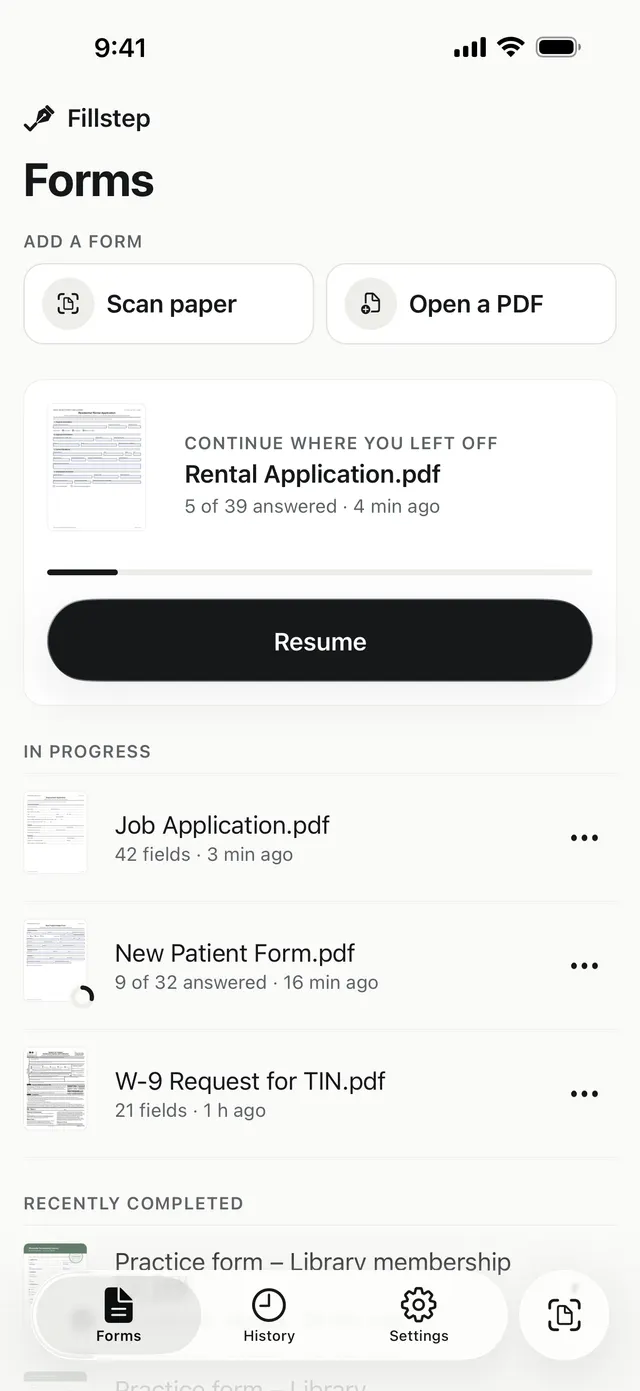
Open or scan the form
Open a PDF from Files, Mail, WhatsApp or Drive, or scan the paper with your camera. Fillstep finds the blanks, even on flat and scanned forms.
- 02
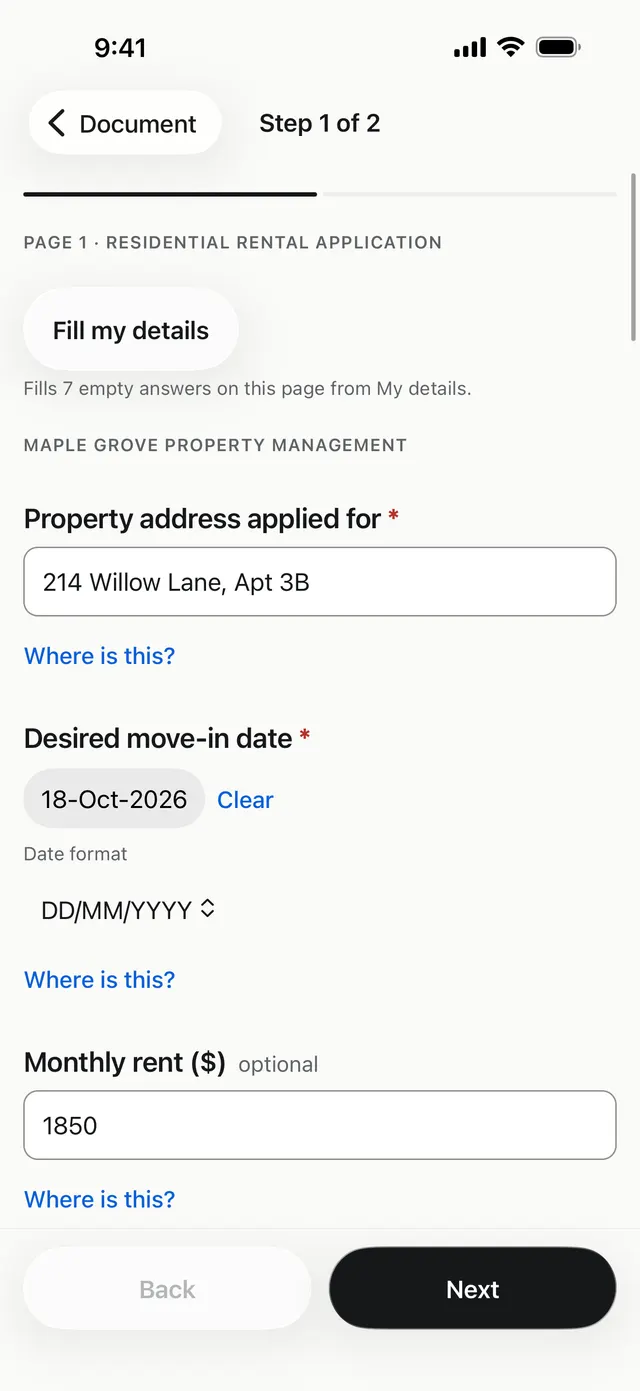
Answer simple questions
Each blank becomes a clear question: text, dates, Yes or No, tick boxes and tables. Tap Where is this? to see the spot on the page.
- 03
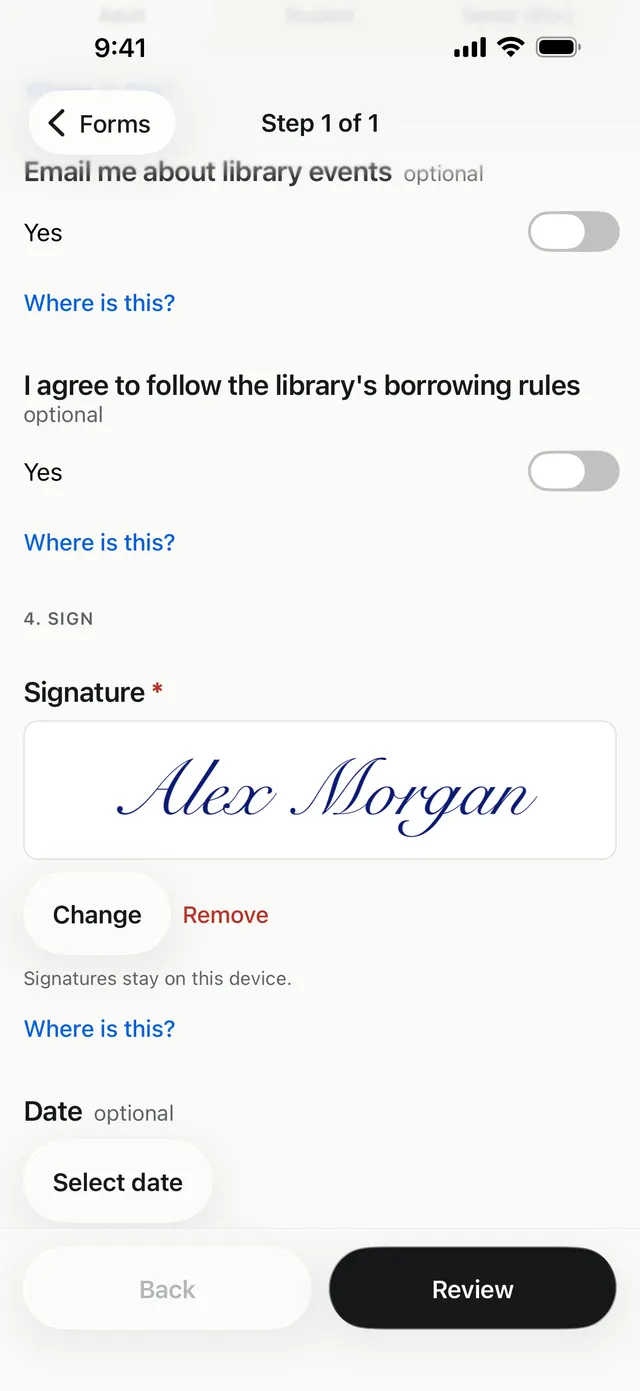
Sign and share
Draw, type or import your signature, then share a normal PDF. Every answer shows in any PDF app.


Made for real forms
Everything a form asks for, without zooming and squinting
Questions, not tiny boxes
Text, dates, Yes or No, tick boxes and tables, one clear question at a time.
Where is this?
See exactly where each answer goes on the page before you commit.
My details
Save your name, address and phone once. Fill a whole page in one tap.
Sign your way
Draw with your finger, type your name, or import a photo of your signature. The paper is removed for you.
Scanned and flat forms
Paper forms and PDFs without fillable fields work too. If a blank is missed, add text anywhere.
Saves as you go
Every answer is kept on your device. Close the app and pick up where you left off.
Add anything, anywhere
Your own text, a date, a tick, a cross or a signature, placed exactly where you want it.
A normal PDF at the end
Answers are written into the file, so they show in Preview, web browsers and any other PDF app.
More than forms
The PDF tools you reach for every week
Scan, sign, convert and clean up documents in the same private app.
- Scan to PDFPaper or photos to a crisp PDF. Crop, straighten and clean up every page.
- Sign a PDFPlace a drawn, typed or photographed signature anywhere on any PDF.
- Hide confidential informationFind emails, ID and card numbers, pick what to hide, and get a copy with them removed.
- PDF to WordTurn a PDF, scan or photo into an editable Word document on your device.
- Erase, watermark and editErase text, add a watermark, or add text and ticks anywhere on a PDF.
Private by design
Your documents stay with you
Forms hold the most personal details you have. Fillstep was built so they never have to go anywhere.
Read the privacy policy- Read on your device
- Text recognition runs on the device with Apple Vision or Google ML Kit. Nothing is sent to us or used to train models.
- No account needed
- Every feature works signed out. Signing in (iPhone and Android) is optional, and your documents are never linked to it.
- No tracking
- No analytics, no ads and no crash reporting services. Pro purchases are checked with the App Store or Google Play.
- You decide what leaves
- A PDF leaves only when you share, save or print it, or, on iPhone and Android, back it up to your own Google Drive.
iPhone · iPad · Android · Mac
One app on every device you fill forms on
- iPhone and iPadOn a large iPad the page sits beside the questions and fills in as you type.
- Android phones and tabletsOpen forms straight from WhatsApp, Gmail or Drive with Share or Open with.
- MacA native Mac app with a Guided view and an On Page view for typing straight into the form.
One App Store purchase covers iPhone, iPad and Mac. On Android, Pro is bought on Google Play.
Pricing
Free to start. Pro when you need more.
Save 3 new forms a month for free, plus free scanning, signing, PDF to Word and watermarks.
Pro is $1.99 a month, $9.99 a year or $19.99 once, and removes every limit.
Questions and answers
Is Fillstep free?
Yes, to start. The free plan saves 3 new forms a month, and scanning to PDF, signing a PDF, PDF to Word and watermarks are always free. Editing or re-sharing a form you already saved is free too. Fillstep Pro removes the limits.
Are my documents uploaded anywhere?
No. Documents, answers and signatures are read and stored on your device. Fillstep has no servers that receive them. A PDF leaves only when you share, save or print it, or turn on backup to your own Google Drive (iPhone and Android).
Does Fillstep work without internet?
Yes. Opening, scanning, filling, signing and saving all work offline. You need a connection only to buy Pro, sign in or back up to Google Drive.
Can it fill a scanned form or a PDF that isn't fillable?
Yes. Fillstep reads the page and finds the blanks on most printed forms, including scans and photos. If it misses one, you can add text, a date, a tick or a signature anywhere on the page.
Will the person I send the PDF to see my answers?
Yes. Your answers are written into the PDF itself, so they show in any PDF app, including Preview and web browsers.
Which devices does Fillstep run on?
iPhone and iPad (iOS 26 and iPadOS 26), Android phones and tablets (Android 8.0 or later) and Mac (macOS 26). There is no web version yet.
Which languages does the app speak?
English, Spanish, Portuguese (Brazil), Arabic, German and French.
Why does my shared PDF say Made with Fillstep?
PDFs shared from the free plan carry a small Made with Fillstep line on each page. Fillstep Pro removes it. The copy kept inside the app never has it.
Fillstep makes electronic signatures for everyday forms such as applications, leases, school and medical forms. It does not create government certificate signatures.

Finish that form today.
Fill, sign and share it from the device in your hand.
One App Store purchase covers iPhone, iPad and Mac.
Fillstep isn't on the stores yet. It's coming to the App Store, the Mac App Store and Google Play. Email me when it's out